About windows operating system


Windows 7: Windows Boot Manager - Delete a Listed Operating System

Windows Boot Manager - Delete a Listed Operating System


EXAMPLE: Windows Boot Manager or "Startup Options" (Windows 8)
NOTE: This is the boot screen where you select what operating system that you would like to start. By default, you have 30 seconds to choose another operating system before the default operating system will start automatically. 
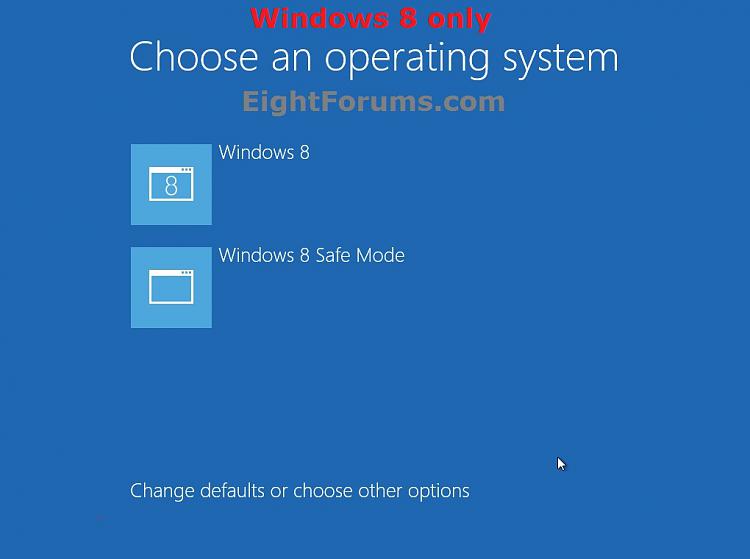
3. Select the operating system you want to delete that is not set as the Default OS, and click/tap on Delete. (see screenshot above)
NOTE: If the OS you want to delete from the list is the Default OS, then you will need to change the default operating system to another listed OS first.
6. Click/tap on the Restart button. (see screenshot below)
WARNING: This will restart the computer immediately. Make sure you save and close anything open that you do not want to lose first. 
NOTE: If you have a RAID setup or a PCI-E SSD as your boot drive and want to open a command prompt at boot, then you may need to use the Load Drivers option in the System Recovery Options screen to load it's drivers first before Windows will see the boot drive to be able to use the bcdedit command on it.
NOTE: This will let you see what OS is the default to start under the Windows Boot Manager section, and to see the description (name) and identifier of the operating system(s) listed in Windows Boot Manager are under the Windows Boot Loader section(s). For example, Microsoft Windows Vista (description) as (identifier). 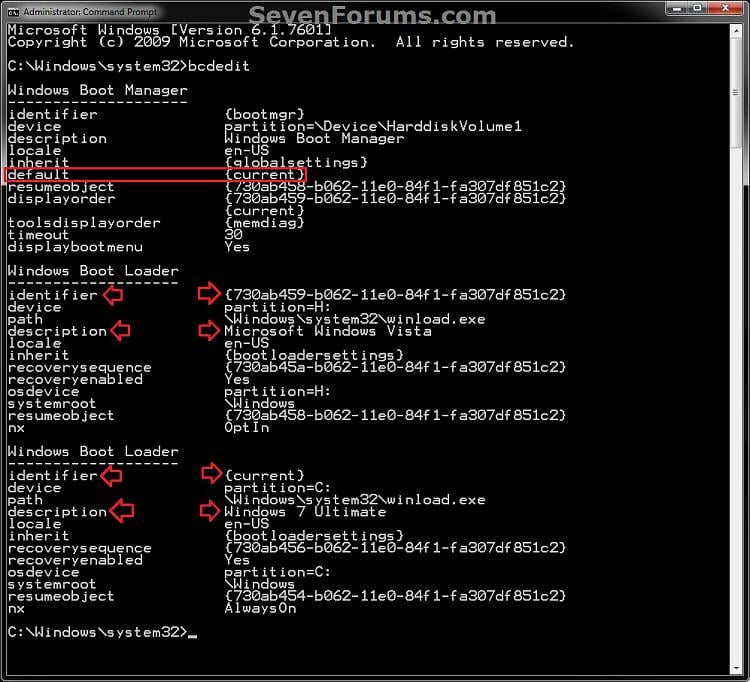
3. In the elevated command prompt, type the command below for a listed OS that you want to delete, and press Enter. (see screenshot below)
NOTE: If the OS you want to delete from the list is the Default OS, then you will need to change the default operating system to another listed OS first. bcdedit /delete
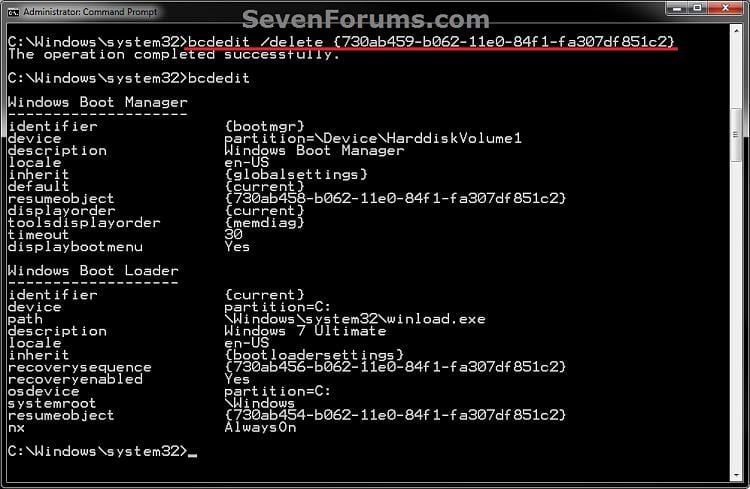
4. In the elevated command prompt, type bcdedit and press enter. (see screenshot below step 3)
NOTE: This will let you see and verify that the OS has been deleted.
NOTE: You can click on the "Download" button at the bottom to download the free version. Registration is not required to download.
NOTE: If the OS you want to delete from the list is the Default OS, then you will need to change the default operating system to another listed OS first. 
3. Click/tap on Yes to confirm deletion. (see screenshot below) 
4. The OS (ex: Microsoft Windows Vista) is now deleted. (see screenshot below) 
5. When finished, close EasyBCD.
CPU Q9450 @ 3.6GHZ 1.34v
Motherboard ASUS P5K PREMIUM P35
Memory 8GB 1066 buffalo firestix @ 1152mhz CL5
Graphics Card Sapphire HD 5970 + GTX260 (physX)
Sound Card Creative X-FI Xtreme Gamer
Monitor(s) Displays SAMSUNG 20'' & SAMSUNG 23'' (dual screens)
Screen Resolution 2048x1152 & 1680x1050
Mouse logitech NX5
PSU XCILIO 850w (78A)
Case CM590 1x 120x38mm & 2x92x38mm / 4x 120x25mm
Cooling AC7 PRO @ 92x38mm blower, Lamptron military bus bay controll
Hard Drives 1x seagate 160gb IDE & 1x seagate 160gb SATA
Internet Speed 2MB
Other Info its a continual ''work in progress''.
System Manufacturer/Model Number Self built custom
OS 64-bit Windows 10 Pro
CPU Intel i7-3930K 3.2 Ghz (O/C 4 Ghz)
Motherboard ASRock X79 Extreme11
Memory 32 GB (4x8GB) G.SKILL DDR3 Quad PC3-19200 2400MHz
Graphics Card ASUS ROG-STRIX-GTX1080TI-O11G-GAMING
Sound Card SB Recon 3Di Integrated Chip
Monitor(s) Displays 3 x 27" Asus VE278Q
Screen Resolution 1920x1080
Mouse Logitech MX Master
PSU OCZ Series Gold OCZZ1000M 1000W
Case Corsair Air 740
Cooling Corsair Hydro H115i
Hard Drives 256GB OCZ Vector 6TB WD Black WD6001FZWX
Internet Speed 300 Mb/s Download and 30 Mb/s Upload
Antivirus Malwarebyte Anti-Malware Premium
Other Info Creative F200 webcam * Lite-On iHBS212 12x BD Writer * Samsung CLX-3175FW Printer * Linksys EA9500 Router * Arris SB6190 Cable Modem * APC SMART-UPS RT 1000 XL
CPU AMD Athlon 64 FX-57
Motherboard Abit AV8 (VIA K8t800P-8237)
Memory Corsair CMX1024-3200C2(2 sticks)Corsair CMX512-3200XL(2 stic
Graphics Card ATI Radeon HD 3850
Sound Card Creative SB Audigy 2 ZS (WDM)
Monitor(s) Displays Samsung SyncMaster 2443BWX
Hard Drives Hitachi HDP725032GLAT80, Maxtor 6 L200MO, WDC WD20 00JD-22HBB0
System Manufacturer/Model Number Self built custom
OS 64-bit Windows 10 Pro
CPU Intel i7-3930K 3.2 Ghz (O/C 4 Ghz)
Motherboard ASRock X79 Extreme11
Memory 32 GB (4x8GB) G.SKILL DDR3 Quad PC3-19200 2400MHz
Graphics Card ASUS ROG-STRIX-GTX1080TI-O11G-GAMING
Sound Card SB Recon 3Di Integrated Chip
Monitor(s) Displays 3 x 27" Asus VE278Q
Screen Resolution 1920x1080
Mouse Logitech MX Master
PSU OCZ Series Gold OCZZ1000M 1000W
Case Corsair Air 740
Cooling Corsair Hydro H115i
Hard Drives 256GB OCZ Vector 6TB WD Black WD6001FZWX
Internet Speed 300 Mb/s Download and 30 Mb/s Upload
Antivirus Malwarebyte Anti-Malware Premium
Other Info Creative F200 webcam * Lite-On iHBS212 12x BD Writer * Samsung CLX-3175FW Printer * Linksys EA9500 Router * Arris SB6190 Cable Modem * APC SMART-UPS RT 1000 XL
CPU AMD Athlon 64 FX-57
Motherboard Abit AV8 (VIA K8t800P-8237)
Memory Corsair CMX1024-3200C2(2 sticks)Corsair CMX512-3200XL(2 stic
Graphics Card ATI Radeon HD 3850
Sound Card Creative SB Audigy 2 ZS (WDM)
Monitor(s) Displays Samsung SyncMaster 2443BWX
Hard Drives Hitachi HDP725032GLAT80, Maxtor 6 L200MO, WDC WD20 00JD-22HBB0
System Manufacturer/Model Number Self built custom
OS 64-bit Windows 10 Pro
CPU Intel i7-3930K 3.2 Ghz (O/C 4 Ghz)
Motherboard ASRock X79 Extreme11
Memory 32 GB (4x8GB) G.SKILL DDR3 Quad PC3-19200 2400MHz
Graphics Card ASUS ROG-STRIX-GTX1080TI-O11G-GAMING
Sound Card SB Recon 3Di Integrated Chip
Monitor(s) Displays 3 x 27" Asus VE278Q
Screen Resolution 1920x1080
Mouse Logitech MX Master
PSU OCZ Series Gold OCZZ1000M 1000W
Case Corsair Air 740
Cooling Corsair Hydro H115i
Hard Drives 256GB OCZ Vector 6TB WD Black WD6001FZWX
Internet Speed 300 Mb/s Download and 30 Mb/s Upload
Antivirus Malwarebyte Anti-Malware Premium
Other Info Creative F200 webcam * Lite-On iHBS212 12x BD Writer * Samsung CLX-3175FW Printer * Linksys EA9500 Router * Arris SB6190 Cable Modem * APC SMART-UPS RT 1000 XL
more than 1 computer a person would remember these things. Alas no.
Thanks for jogging my memory, Doug
System Manufacturer/Model Number Drywallguy
OS Windows 7 Pro x64
CPU AMD FX 6300
Motherboard Asus M5a99FX pro
Memory 8GB Gskill Sniper
Graphics Card Sapphire AMD HD 7770
Sound Card On board
Monitor(s) Displays Samsung Syncmaster 2253 & LG Flatron W2242T
Screen Resolution 1680 X 1050
Mouse Microsoft Trackball Explorer
PSU OCZ StealthXStream 700W
Hard Drives 5 Western Digital and Seagate mix Totaling 2.5 TB
System Manufacturer/Model Number Self built custom
OS 64-bit Windows 10 Pro
CPU Intel i7-3930K 3.2 Ghz (O/C 4 Ghz)
Motherboard ASRock X79 Extreme11
Memory 32 GB (4x8GB) G.SKILL DDR3 Quad PC3-19200 2400MHz
Graphics Card ASUS ROG-STRIX-GTX1080TI-O11G-GAMING
Sound Card SB Recon 3Di Integrated Chip
Monitor(s) Displays 3 x 27" Asus VE278Q
Screen Resolution 1920x1080
Mouse Logitech MX Master
PSU OCZ Series Gold OCZZ1000M 1000W
Case Corsair Air 740
Cooling Corsair Hydro H115i
Hard Drives 256GB OCZ Vector 6TB WD Black WD6001FZWX
Internet Speed 300 Mb/s Download and 30 Mb/s Upload
Antivirus Malwarebyte Anti-Malware Premium
Other Info Creative F200 webcam * Lite-On iHBS212 12x BD Writer * Samsung CLX-3175FW Printer * Linksys EA9500 Router * Arris SB6190 Cable Modem * APC SMART-UPS RT 1000 XL
OS Windows 7 Professional x64
CPU Intel Core i7 860
Motherboard Gigabyte GA-P55-UD4P
Memory 4GB DDR3 Mushkin 1600Mhz @ 7-8-7-20
Graphics Card MSI GTS250 1GB DDR3 Twin Frozr
Sound Card Onboard realtek
Monitor(s) Displays Samsung SyncMaster 24" P2450 + Samsung 20" 2033
Screen Resolution 1920 X 1080 and 1600 X 900 (#2 system 1440 X 900)
Mouse Microsoft wireless laser mouse 5000
PSU Corsair 750 HX Modular
Case Lancool PC-K62
Cooling Cooler Master TX3 CPU cooler and 4-140mm and 1-120mm case
Hard Drives Patriot Inferno 120GB SSD + 3 WD Blue 640GB drives
Internet Speed 7 Mb down 1.5 up
Other Info System #2: AMD Phenom II X6 1055T (Freezer 7 Pro cooler) - Gigabyte 880GMA-UD2H - WD 500GB Black - 9500GT (1GB) 500W OCZ modular PSU - Antec 200 case. System #3 (LapTop) Core 2 Duo T6670 - 320GB 7200RPM HD - 4GB DDR3 RAM.
Windows Boot Manager - Delete a Listed Operating System
Hello guys, this is on a different computer by the way. The other computer is Windows XP with no other operating systems. I am trying to delete it to install Windows 7 (64-bit) but when I put the disc in, it says BOOTMGR not found. I have used this disc on a different computer and it worked.
My wife's computer crashed yesterday. She got a blue screen and then it rebooted. When it boots it will load the BIOS but then just hangs on a screen that says loading operating system. I tried using the win7 recovery disk, but it was unable to repair the startup issue. I am also unable to select.
brothers laptop samsung np-r519 tried to boot up but it is saying no operating system dont have windows disc dont have recovery disc tried pressing f4 on boot up but it says boot from ACHI . pressed f2 and sata 1 is recognised i think . any help much appreciated
How to Change the Listed OS Arrangement Order in Windows Boot Manager Screen If you have more than one OS installed on your computer, then this will show you how to change the order of the listed operating systems in the Windows Boot Manager screen to be arranged in any listed order that you.
I want to set up to run both core processors at start up. I ran msconfig. Selected the boot tab. There is no operating system listed. Without a system listed, I can not select advanced. I downloaded Easy BCD. Upon running, it gives an error that no BCD file is found. I am at a loss. Any ideas? .
Hi, I have noticed a problem with my computer I when I open msconfig there is no OS listed in the boot section and I am unable to click on any of the options within that window. I have also checked under start up and recovery and its also not listed in there either. ImageShack: Host and.
All times are GMT -5. The time now is 08:19 .


Комментариев нет:
Отправить комментарий