Missing Operating System? 2 Ways to Fix it!
1 Help! Missing Operating System in Windows!
It really can't be more annoying than this: when sitting in front of the computer and start it, it gives you back a message saying "Missing operating system" or "Operating system not found" on boot. The reasons for this errors are hard drive is corrupted, Boot record is corrpted, BIOs not detect hard disk, missing or corrupted command.con, virus infection, etc.
Fix it, and you will find your operating system will become normal.
2 2 easy solutions to get back your missing operating system
You can fix this operating system missing problem easily and effortlessly by yourself with Windows OS DVD (Windows 7, Vista and XP). If you don't have a Windows OS DVD, I still have another solution for you.
Solution 1 Fix it with Windows OS DVD
1. Insert Windows OS DVD on your computer.
2. Click the a key when you are asked to (to boot from DVD).
3. Then choose "Repair your computer", not "Install now", remember this.
4. Select the operating system after the installer searches for Windows installation, and click "Next".
5. Then click "Startup Repair". It will automatically fix problems that are preventing Windows from starting.
Solution2. Fix it with a bootable disk/USB
If you don't have a Windows OS DVD, and have no plan to spend hundreds of dollars on it, you can take this way. Getting a bootable disk or USB can solve your problem too. Wondershare Liveboot CD/USB can be a good option for you repair this operating system missing issue safely and completely. And it's more competitively priced, compared to the Windows DVD.
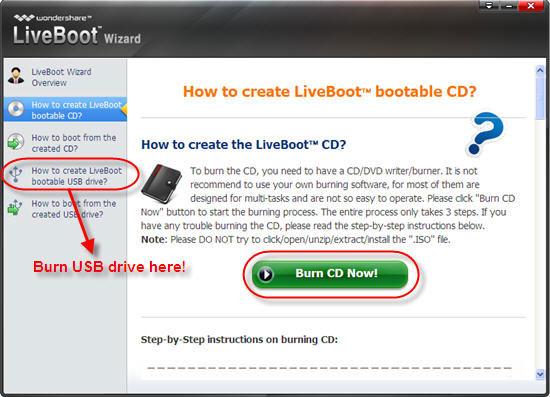
1. Create a bootable CD or USB drive with Wondershare LiveBoot 2012. Insert a blank CD or USB drive into the computer and run the Wondershare LiveBoot. Choose the guide of creating a bootable CD or USB drive according to your requirement. You only need to perform a click on the burning button in the center.
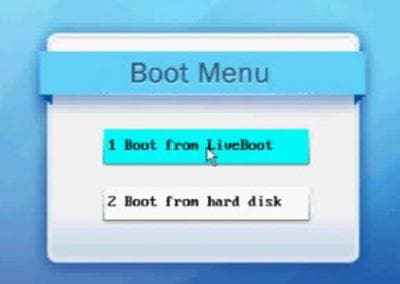
2. Insert LiveBoot bootable CD or USB into your computer, then restart the computer and press F12 to get into the Boot Menu. Choose the USB CD-ROM Drive and proceed. Then choose "Boot from LiveBoot".
3. After getting into the system, LiveBoot will be launched automatically. Choose "Windows Recovery" on the top tab and hit "Boot Crash Solution" on the right menu. In the part of "Type A error messages", you will see "missing operating system" in No. 5.
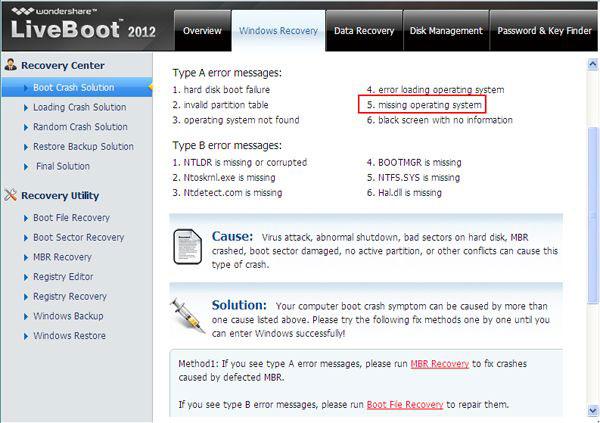
4. The main reason why operating system is missing is because of the damage of MBR, so take the method 1 as its instructions to repair it.
If this method doesn't work, running a disk check to fix bad sectors which will affect your system files loading, or running bootsect command at Command Prompt to repair boot crash. If all these are not helpful, your operating system must have been damaged deadly, and you have to take the last one to reinstall your Windows and Office. Doesn't matter, this LiveBoot can help you reclaim your Office key and Windows CD key with one click in the part of "Password & Key Finder", no extra money cost.
3 Recover data from "System Operation is Missing" computer
If you are afraid of losing important files on your "System Operation is Missing" computer, Wondershare Data Recovery can help you recover data from computer hard drive with ease.
The Best File Recovery Software
- Recover lost or deleted files, photos, audio, music, emails from any storage device effectively, safely and completely.
- Supports data recovery from recycle bin, hard drive, memory card, flash drive, digital camera and camcorders.
- Supports to recover data for sudden deletion, formatting, hard drive corruption, virus attack, system crash under different situations.
- Preview before recovery allows you to make a selective recovery.
- Supported OS: Windows 10/8/7/XP/Vista, Mac OS X (Mac OS X 10.6, 10.7 and 10.8, 10.9, 10.10 Yosemite, 10.10, 10.11 El Capitan, 10.12 Sierra) on iMac, MacBook, Mac Pro etc.
After attaching the CD/USB with your computer and launching Wondershare Data Recovery, you can easily and effectively to perform "Partiton Recovery", "Deleted File Recovery" and "RAW Hard Drive recovery". Follow the next simple steps to perfrom lost file recovery:
Step 1: Select the type of files/data you want to recover and next.

Step 2: Select the location where you lost file, you can select the option of "Whole Computer" to start scanning lost files.

Step 3: The deep-scan option is an advanced scanning mode and once activated it will take longer analysing the data structure on your storage medium, thus more files/data could probably be found. (If quick scan cannot find your lost go to deep scan.)

Step 4: After the deep scan completed, you can preview the recovered files from the deep scan result. Save them to another safe storage device.

Technically, except for those damaged or overwritten files, all lost/deleted files on your computer/flash drive or memory card could be re-detected and recovered by Wondershare Hard Drive Data Recovery.
Fix Computer

Windows 7 won't boot? The best way is to get a professional Windows 7 boot disk, which can totally remove your loading problems. .

Operating system can't be simply copied, or it won't work on your computer. Then how to move it to other disk? This guide tells you to do it in 3 steps. .

How to restore corrupted files? It's simple. Just read this guide and you can restore corrupted files in 3 simple steps. .

This page offer the best solution to fix Vista won't boot up, and the best way to recover lost data caused by Vista won't boot up error. .

Learn to handle the most delicate file within the windows OS. All you need to know about ntdll.dll file and related issues. .

The article discusses the issues around the AMD Quick Stream Error which has been troubling many users of Windows 10. We list out all the solutions. .

Комментариев нет:
Отправить комментарий