Previous Post
How to download and install Windows 10, for free [Guide]
Tip / Trick
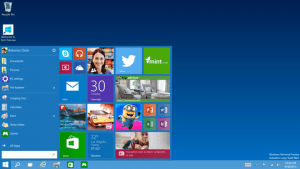 If you are a big fan of Windows operating systems, you must be anxious about the new OS — Windows 10. Good news: Microsoft just released the Windows 10 Preview (Technical Preview) last month which you can download and install now… for free!
Just to clarify a few points here, this is not the final version of Windows 10, which is going to be released next year. Windows 10 Preview is an official beta version, designed to give customers a preview and a test drive of what the new generation of OS is going to be like. If you already saw the commercial of the Windows 10 Preview and the new features looked appealing to you, I am sure you must be eager to have a tour in the Windows 10 Preview world for yourself. In this article, we show you how. Keep reading to learn more.
BEFORE WE BEGIN
Before we begin, since this is a beta version of Windows 10, it is highly recommended to install it on a separate partition on your hard drive instead of over your main Windows. To do that, first you need to resize or create a new empty partition on your hard drive. This can be done with any partition manager; if you don’t have a partition manager, read dotTech’s guide on best free partition manager for Windows.
Also, another thing to keep in mind, you may want to install Windows 10 virtually in VirtualBox or VMware instead of on your actual hard drive, if you want to test it out. In this guide, we are not showing you how to install Windows 10 virtually per se but you can download the Windows 10 ISO from the links we have provided below and easily load the ISO into VirtualBox or VMware to install. If you don’t know how to install Windows 10 in VirtualBox, read our guide on how to install Windows 10 in VirtualBox for free.
HOW TO DOWNLOAD AND INSTALL WINDOWS 10 FOR FREE
So how to download and install Windows 10 for free? I will show you now:
- Go to the website http://windows.microsoft.com/en-gb/windows/preview-iso. You will see a list of download links as shown below; pick one. I chose “English (United States) 64-bit (x64)” for demonstration here. This download will give you the ISO (a disc image) which you can burn to a bootable device and install Windows 10 from.

- After you obtain the ISO, file, you will need a bootable device (it can be a DVD, USB, or external hard drive). Burn the ISO to a bootable device using any modern burning program. If you don’t have one, read dotTech’s guide on best free burning program for Windows. If you are going to install Windows 10 in VirtualBox, you do not need to burn the ISO file to a bootable device; rather, you need to now go read our guide on how to install Windows 10 in VirtualBox for free because you can use this ISO file directly in VirtualBox to install Windows 10.
- After you are done creating the bootable device, you will need to plug it into your computer or put it in your disc drive and reboot your computer. Upon reboot, you will need to make sure to boot from your bootable device. For modern computers, you should automatically see a prompt on your screen to do so. If you don’t see a prompt, you will have to modify the boot order from your BIOS; accessing the BIOS for each computer is different; when your computer boots up, at the logo screen read the bottom of the screen to see which hotkey you need to press to enter the BIOS.
- After you’ve booted with the bootable device, you will be prompted with an install screen. Simply follow on-screen instructions to install Windows 10!
CONCLUSION
Is Windows 10 the next big thing? Try it for yourself and find out!
Related Posts
Previous Post
About Zicheng Ren
Related Posts

Download and record any song or video from the web with KeepVid Music [Windows]
Download 1080p and Ultra HD videos from any site with KeepVid Pro [Windows]
Tip / Trick
How to add/remove apps and programs in Windows 10 [Tip]
Tip / Trick
How to save space by cleaning up Component Store (WinSxS folder) in Windows 10 [Tip]
So is it safe to say that always backup win 7 for safety sake? Windows 10 is better? I have Windows 7 and I like it but why always a better system only to Rip Off the public with something that might not be better?
Not everybody has $120 for systems if it screws up other systems. If it’s downloaded on the system leave it alone and let Users have it free for Veterans. As speaking as a VET, it’s hard enough to make ends meet.
I have found the disappointing answer.
First 3 builds expire this month (April 2015)
Last 3 builds expire Oct 2015
I assume that there will be a date limitation with Win 10 ?
Could you tell me when it will expire ?
Thanks for the article,
@Julian: Thanks for the info. My confusion is probably due to my recent experiments with smaller Linux builds (on older machines) – which, as far as my experience goes, can be run “alongside” one another from DVD’s as seperate OS’s (or alongside XP).
Thanks again & greetz,
The ONLY way to install Win 10 is over a Win 7/8/8.1 installation – (as though you were upgrading your system to Win 10) which is what you are doing when you try out Win 10. If you clone your current windows installation onto another hdd/ssd you can then hang on to your original OS installation. Windows 10 is not merely added to another OS, it replaces it with no way of getting it back. So if you want to keep hold of your original Windows, either install Win 10 onto a clone OR make a virtual partition, install Win 7 or whatever, then install Win 10 over the top. The current version (Technical Preview) of Win 10 CANNOT run as an independent OS (although this is transparent when you are running it).
Right… If I understand it correctly I could, as administrator, install Win10 for a 2nd (non-administrator) user and run it alongside Win7 without possibly “harming” my original Win7 installation? Provided I have diskspace for a large enough parition. But installing Win10 on a DVD and running it from there (after burning a ISO-image ona seperate DVD) would not work because of it’s dependence on Win7?
BTW, I hope MS is not planning on dropping Win7 in the next couple of years.
I’m hoping my question doesn’t sound too rediculous to even consider it…
Greetz from Patrick.
Thanks for your Experience feedback
I very much doubt it because Windows 10 requires a previous version of Windows to integrate with upon installation. MS advises users to ‘not run as your primary operating system’. Why not download and burn the ISO and discover the answer for yourself – you have nothing to lose if you have another copy of your primary system.
Can this ISO run as a live environment from a DVD ROM without loading it to the HDD?
I tried out Windows 10 by cloning W7 onto a separate hard drive (a month ago ) – then installing W10 on that (so that I wouldn’t ruin my current W7 OS which runs on a Sata 3 SSD). My separate HD is a Sata 2 and I hated going back to a slower system. So, I returned to my W7 SSD – made another clone – and installed W10 onto my SSD. I shall most definitely NOT be returning to W7 unless Microsoft insists. Windows 10 is a beautiful system which runs like a dream, I have always tried out the Windows Beta’s (from XP onwards) and the only ones I haven’t liked were W8 and 8.1.


Комментариев нет:
Отправить комментарий